I’ve got Virgin Media fibre at home and am generally pretty happy with it. About a month ago I finally got around to putting the Virgin Media hub into modem mode, passing all traffic through to an OPNsense firewall to control the network properly. That device segments the network into multiple VLANs for work, home users, guests, internal servers, IoT devices, CCTV and security - just normal security segmentation. Nothing too fancy.
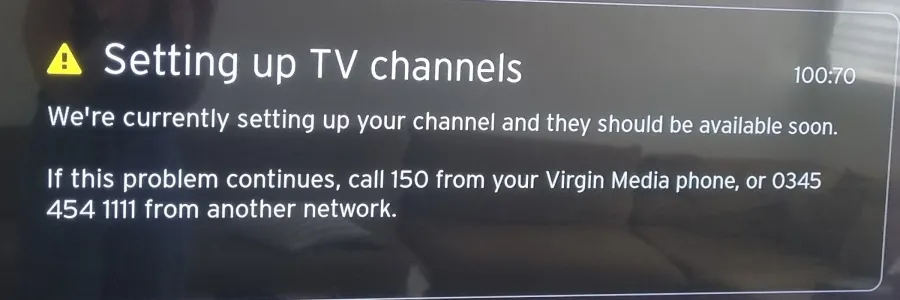
The Virgin Media TV boxes lived on the IoT VLAN and were working as expected for about a month. Until they stopped. They started displaying a “Setting up TV channels 100:70” error and wouldn’t show any channel content although the TV guide appeared to update itself quite happily and the apps like iPlayer, Netflix and the like ran without incident.
The short version
If you run Virgin Media TV equipment behind a third-party firewall on a segmented network, and your box is passing diagnostics but not showing your programs, try a rule allowing outbound traffic to 62.253.90.25 on port 2003 before calling support.
The longer version: what the diagnostics told us (and didn’t)
“No problem” I thought, I’ll run the diagnostics and see what I’ve messed up, even though it had been some time since I’d actually made any changes to that part of the network.
This is where it got interesting: the diagnostics showed everything was fine. Lots of green ticks. And if you know IT troubleshooting then you know green ticks are good. So far as the boxes were concerned everything was great: network connectivity, working DNS, internet access, could reach all the necessary services. Except they obviously couldn’t.
Now I don’t want to spoil the ending but with hindsight at this point I should have done a more in depth check of the traffic that the firewall was dropping.
We escalated to Virgin Media support. The person on the end of the phone swore blind we would need new boxes, although was unable to explain how two boxes would fail with the same error at the same time. An engineer visit was arranged. The poor engineer spent several hours onsite running his own diagnostics and again everything passed. He went away after having spoken with colleagues and having escalated at his end. He left his mobile number and said he would be in touch once he’d spoken to a few additional people.
Finding the actual problem
The breakthrough was two-pronged: I had added some additional logging to OPNsense to review when I had a bit more time; the engineer came back to us and noted that one of his colleagues had noticed their systems were not receiving any “sign of life” data back from our boxes.
Pulling up the new OPNsense logs and filtering on the TV box IP addresses gave the answer. Among the random noise of dropped IoT traffic there was an intermittent blocked connection attempt to a single IP address:
Destination IP: 62.253.90.25
Port: 2003
Protocol: TCP/UDP
The fix
A quick check confirmed the IP resolved to Virgin Media infrastructure so I added a firewall rule to allow outbound traffic from the TV box to 62.253.90.25 on port 2003. And that was it. The problem resolved almost immediately.
Closing thoughts
Firstly credit to the engineer for doing what he promised and following up. That’s rarer than it should be and he should be applauded. I’ve sent him my findings so hopefully this network information will make its way to where it’s needed in the VM troublshooting system.
Secondly yes, I should have checked the firewall sooner. But in my defence, if the box says it’s cool then I trust it’s cool. And the very limited information in the error message itself and Virgin Media’s own post on the 100:70 error suggested it was account-related, which sent the diagnosis in the wrong direction.
The frustrating part of this fault is that the TV box’s own diagnostic tool gave no indication of the problem. A diagnostic test that reports all tests passing while seemingly ignoring or unaware of a missing critical connection is a poor diagnostic implementation. Couple that with port 2003 not appearing in any Virgin Media documentation I could find; not being referenced in any of the guides for running their equipment behind a third-party firewall; their phone support and onsite engineers seemingly not knowing to verify connectivity on that port. It all becomes far more involved than it should be.